Adding the DS2 Doorstation
Requirements
-
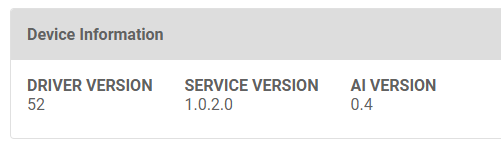
Luma Insights driver version 52 or higher which automatically updates within 24 hours of the release, or you can download it from the Online Driver Database.
-
Insights Service version 1.0.2.0 or higher which automatically installs within 24 hours of the release. The DS2 operates on version 1.0.1.0 as well, but there is a bug fix in 1.0.2.0 that is desirable to have.
Note: If you want audio captured from Luma Insights, enable the
Audio in RTSP Stream
setting on the DS2 driver under the
Streaming
section. If you still do not have audio in Luma Insights, reboot the DS2.
Adding the DS2
-
To add the DS2 to Luma Insights, ensure that your DS2 is added to the Control4 project, identified, and is seen in OvrC.
-
Add the DS2 camera as described in Setting up the Luma Bridge by selecting the cameras in the Unassigned Cameras list and clicking Assign.